Order Creation
The Grasshopper integration creates and updates orders based on thePO Number field.
The PO Number field is used to store the CDS Order Number also known as the System #
If PO Number does not exist, then order is created in the Grasshopper site.
If PO Number already exists, then order is updated in the Grasshopper site.
Important
When new orders and order updates are sent to the integrated Grasshopper site, duplicates will be created if the CDS Order Number is not found in the PO Number field.
Order Updates
If order is updated in Vision Ops, Grasshopper will include updates listed below.- Order Cancellations
- Order Scheduled/Rescheduled
- Order Timeframes
- Order Notes
- Order Commodities
- Order Scheduled/Rescheduled
- Order Timeframes
- Order Notes
Order Barcodes
Barcode integration is not supported. Orders must be scanned using CDS scanners and Grasshopper scanners.Order Delivery ETA (Estimated Time of Arrival)
CDS orders must be set toOut for Delivery to fetch order real-time ETA (Estimated Time of Arrival) by CDS applications.
Orders can be set to Out for Delivery in the Grasshopper scanner by drivers, or in the Grasshopper site by office staff.
Refer to sample screenshot when order is set to “Out for Delivery” and displaying ETA.

Failed to Schedule Order
To schedule orders in Grasshopper, manifests must be available for the intended scheduled dates. An email will be sent if the integration cannot schedule the order, see sample email below for reference.From: donotreply@cdsalerts.com <donotreply@cdsalerts.com> Subject: Action Required: Manifest Creation Needed for Order Number 12345 This is an automated notification regarding Order Number 12345. Please be advised that the order could not be automatically scheduled for 2025-12-31 due to the absence of an available manifest for that date. To proceed, please create a manifest for 2025-12-31 and ensure that Order Number 12345 is scheduled accordingly. Thank you for your attention to this matter. Sincerely, CDS Logistics
Field Mapping
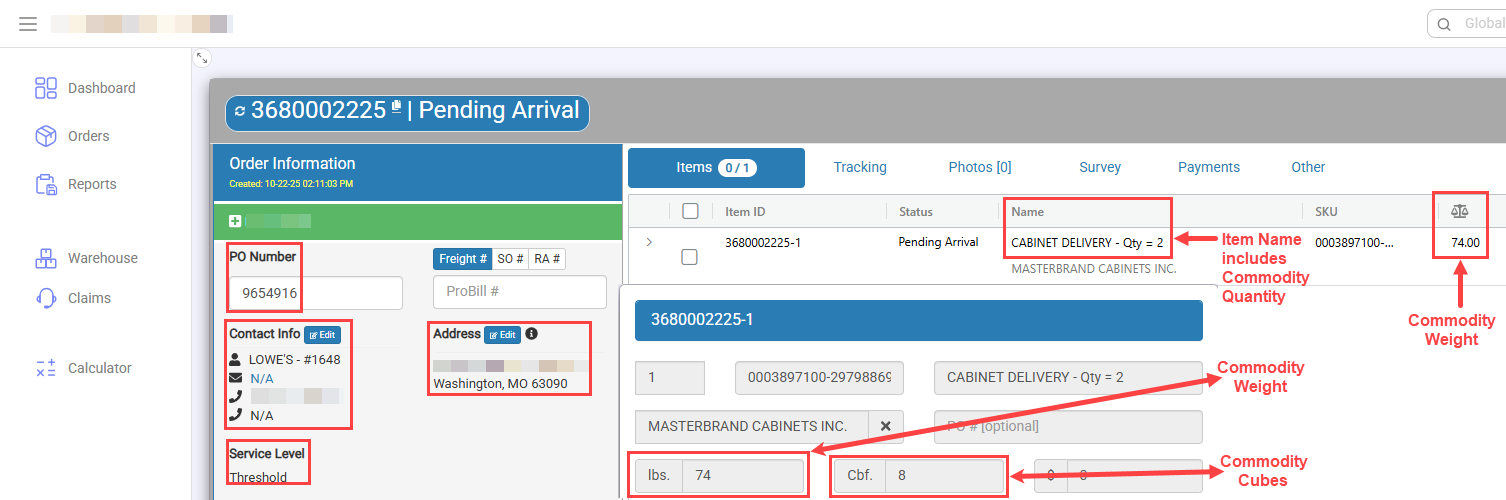
- PO Number = Vision Ops - System #
- Contact Info = Vision Ops - Consignee Name and Phone Number
- Address = Vision Ops - Consignee Address
- Service Level
- White Glove - WG (default)
- Threshold - THR
- Items
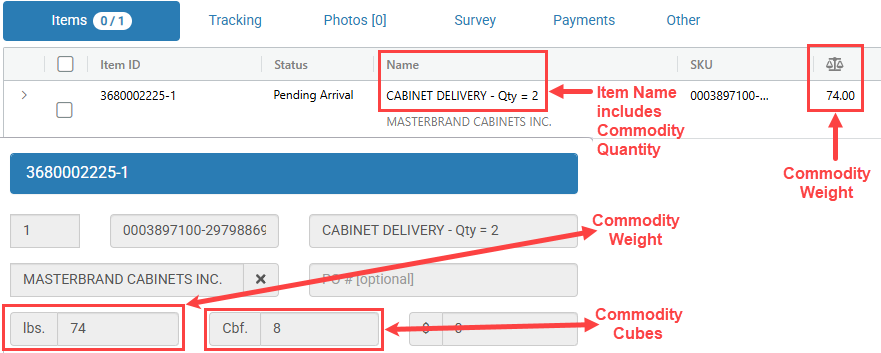
- Name = Vision Ops - Commodity Code with Quantity
- SKU = Vision Ops - CRN
- Cubes = Vision Ops - Commodity Cubes
- Weight = Vision Ops - Commodity Weight
- Notes = Vision Ops - Notes
Release Notes
10/22/2025
Update Items now include commodity quantity, cubes and weight